Honest Game Reviews UK: How to Find Games Worth Playing (2026)
Honest game reviews for UK gamers: read Steam reviews like a pro, find games like your favourites, know your rights and get hot takes on PlaySpill.
Contents
- Why one review score isn't enough
- Critic reviews vs. player reviews
- How to read Steam user reviews
- Game reviews in the UK: PEGI ratings and your rights
- PEGI age ratings
- Your rights when a game isn't as described
- How to find honest game reviews (a 5-step routine)
- What is PlaySpill?
- Gaming news without the noise
- Hot takes: the fastest way to learn what people really think
- How to find games like the ones you love
- Upcoming games and the best games of the year
- For game developers: reviews start before launch
- Frequently asked questions
- What is PlaySpill?
- Is PlaySpill free?
- Where can I find honest game reviews?
- Are Steam reviews reliable?
- How do I find games like my favourite game?
- Is PlaySpill available in the UK?
- Is PlaySpill on mobile?
- The bottom line
Looking for honest game reviews before you spend £70 on the next big release? You're not alone. Across the UK, "game reviews" spikes on Google every time a major game launches, and searches for "games like…" (as in games like Stardew Valley or games like Dispatch) are now the most searched of the lot, climbing month after month.
The problem: a single review score rarely tells you whether you will enjoy a game. Critics play on deadlines, store pages are written by marketers, and comment sections are full of noise. This guide shows UK gamers how to read game reviews like a pro, how to find games like the ones you already love, what your rights are if a game isn't what was promised, where to find gaming news and hot takes you can trust, and how PlaySpill, the social app built only for gamers, puts all of it in one place.
Why one review score isn't enough
A number out of ten is a summary of someone else's experience. It can't know that you hate grinding, love co-op, play on a Steam Deck, or only have an hour a night. Before you trust any score, ask three questions:
- Who played it? A genre veteran and a newcomer will judge the same game very differently.
- How long did they play? Some games only open up after ten hours; others fall apart after twenty.
- When did they play? Launch-day performance, patches and balance changes can turn a mess into a gem (or the other way around).
That's why the smartest players don't rely on a single review. They combine critic reviews, player reviews, and real conversations with people who play the same way they do.
Critic reviews vs. player reviews
Both are useful, and they answer different questions.
| Critic reviews | Player reviews | |
|---|---|---|
| Best for | Story, design, polish, comparing to the genre | Performance, value for money, long-term fun |
| Written | Before or right at launch | Days, weeks and months after launch |
| Watch out for | Deadline pressure, early builds | Review bombs, very short playtimes |
| Where to find them | Gaming sites, aggregate scores | Steam user reviews, communities like PlaySpill |
How to read Steam user reviews
Steam's summary labels (from Overwhelmingly Positive down to Overwhelmingly Negative) are built from thousands of real players, which makes them one of the best signals out there. A few tips:
- Check "Recent" as well as "All". A game that launched badly but got fixed will show it in recent reviews.
- Look at hours played. A negative review after 300 hours means something different from one after 20 minutes.
- Spot review bombing. Sudden waves of negative reviews about something outside the game (a price change, a controversy, a publisher decision) don't always reflect how the game plays. Steam marks some of these periods as off-topic review activity.
- Read the helpful ones. The most helpful reviews, positive and negative, usually explain why.
If reviews are split, Steam's refund window (more on that below) is your safety net.
Game reviews in the UK: PEGI ratings and your rights
Two things work a little differently for UK players, and both are worth knowing before you buy.
PEGI age ratings
Games sold in the UK carry PEGI ratings (3, 7, 12, 16 and 18), with content descriptors for things like violence, bad language, fear and in-game purchases. A PEGI rating tells you who a game is suitable for, not whether it's any good, so read it alongside reviews, especially if you're buying for a younger player.
Your rights when a game isn't as described
Under the Consumer Rights Act 2015, digital content you buy in the UK, games included, must be as described, of satisfactory quality and fit for purpose. If a game is badly broken or nothing like its store page, you can ask the seller to fix it, and if they can't, you may be entitled to a price reduction or refund. Store refund policies sit on top of that: Steam, for example, generally refunds games within 14 days of purchase if you've played for under two hours.
Player reviews are often the first warning that a game launched in a state that doesn't match its trailers, which is one more reason to check them before you buy.
How to find honest game reviews (a 5-step routine)
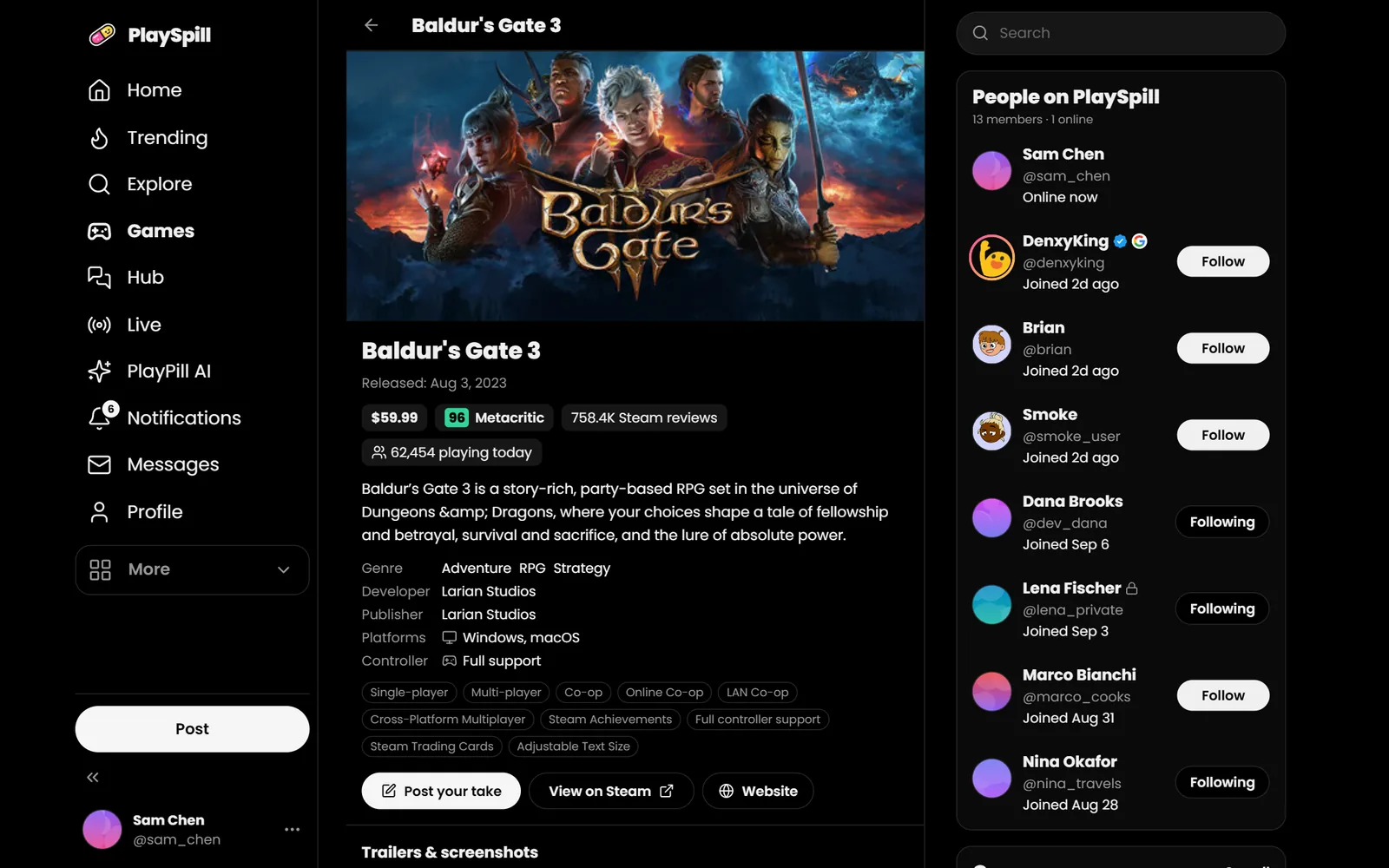
- Start with the game page. Get the basics: genre, price, platforms, controller support, multiplayer modes, and how many people are playing right now.
- Read the player verdict. Steam reviews tell you how thousands of players feel overall.
- Find people like you. Look for players who share your taste and ask the question you actually care about: "Is it fun solo?", "Does it run on a Steam Deck?", "Is the endgame worth it?"
- Check recent news. Patches, roadmaps and price drops change the answer fast.
- Watch the hot takes, then make up your own mind. Strong opinions are great for spotting what people love and hate about a game. Just don't let one loud post decide for you.
PlaySpill was built around exactly this routine.
What is PlaySpill?
PlaySpill (sometimes searched as "Play Spill") is a free social app for gamers at playspill.app. Every post is about games: hot takes, gossip, reviews, rumours, LFG and devlogs. No food pics, no politics, just games.
Here's what makes it useful when you're deciding what to play:
- A page for every Steam game. Every game on Steam gets its own page on PlaySpill, kept in sync with Steam automatically: price, review summary, how many people are playing today, genres, platforms, trailers and screenshots. Browse the games.
- Real player opinions on every game. Each game page collects what players are posting about it, and every game has its own feedback page where players say what they love, what they hate, and what should be fixed.
- Thumbs up and thumbs down. Instead of hearts, posts get a thumbs up or a thumbs down, so the most agreed-with takes rise and the worst ones get ratio'd.
- Feeds for every mood. Gossip, hot takes, drama, rumours, reviews, complaints, indie games, clips, memes and LFG, each with its own feed.
- Trending, today. See what the community is arguing about right now.
- Your squad, one DM away. Real-time messages with read receipts, so you can turn a "who's playing tonight?" post into an actual session.
- Built for game developers too. Indie devs post devlogs and get honest feedback from the people who will actually play their game. See PlaySpill for developers.
You can browse PlaySpill without an account. Posting, voting and messaging take a free account, and you can sign up with Google or Discord in under a minute (ages 14+).
Gaming news without the noise
Gaming news moves fast: shadow drops, delays, patch notes, layoffs, leaks and showcase announcements can all land in the same afternoon. A few habits help you keep up without drowning:
- Separate confirmed news from rumours. On PlaySpill, rumours live in their own feed and are always labelled unverified, so "I heard…" never gets mistaken for an announcement.
- Follow the games, not just the headlines. A game's page on PlaySpill shows what players are posting about that game, which is far more useful than a generic news feed when you're deciding whether to buy.
- Check the comments, not just the headline. Players are often the first to notice what a patch actually changed, or what a trailer didn't show.
If you like your gaming news with opinions attached, the gossip feed and hot takes are where the community reacts in real time.
Hot takes: the fastest way to learn what people really think
Hot takes get a bad reputation, but they're useful. A good hot take ("this sequel is better than the original, fight me") starts a conversation that surfaces the real strengths and weaknesses of a game far faster than a polished review.
What makes hot takes valuable is the reaction. On PlaySpill, you can see at a glance how many players agree (thumbs up) and disagree (thumbs down), and read the replies where people explain why. A post with lots of both is usually a game worth looking into, because it's the kind of game people care about.
Some favourite hot-take formats to try:
- "Overrated / underrated:" name a game and defend it.
- "The one thing that would fix this game is…"
- "I'd erase this game from my memory just to play it again for the first time."
- "Day three of the patch and…" (complaints are allowed, and there's a feed for them).
How to find games like the ones you love
In the UK, "games like [your favourite]" is right now searched more than "game reviews", "gaming news" and "upcoming games" put together, and for good reason: when you love a game, you want that feeling again. Here's how to find it:
- Name what you loved, specifically. Not "Stardew Valley" but "relaxing farming with a small town and seasons." The more specific you are, the better your matches.
- Use genres and tags. Every game page on PlaySpill lists genres and features (co-op, controller support, multiplayer), so you can jump to games that share them.
- Ask the community. A post like "Looking for games like Hades with better co-op" in the discussion feed will usually get better answers than any algorithm, because the replies come from people who played both.
- Check indie games. Many of the best "games like…" answers are smaller indie titles. The indie feed is where players share them.
- Watch what's trending. Games that suddenly trend on PlaySpill are often the ones people can't stop recommending.
Upcoming games and the best games of the year
Every year, searches for "upcoming games" and "best games of the year" spike around big showcases and again at the end of the year. In the UK, searches for upcoming PC games and upcoming PS5 games are rising fastest right now. Instead of waiting for year-end lists, you can follow the conversation as it happens:
- Upcoming games: what's on the way, with a page for each.
- New releases: what just came out, and what players think of it.
- Steam deals: good games at good prices.
- Next Fest: demos you can try for free before you commit.
- Top rated and most played: what players are rating highly and playing most.
For game developers: reviews start before launch
If you're making a game, the reviews that matter most are the ones you get before launch, when you can still act on them. PlaySpill gives every game a page and a feedback page, and the devlog category lets you share progress, find playtesters and build a following among players who already care about your genre.
Honest feedback early beats a wave of negative reviews later.
Frequently asked questions
What is PlaySpill?
PlaySpill is a free social app for gamers at playspill.app. It's where gamers post hot takes, gossip, reviews and rumours about games, with a page for every Steam game and feeds for every kind of gaming conversation.
Is PlaySpill free?
Yes. Browsing, posting, voting, messaging and game pages are free. You can sign up with Google or Discord.
Where can I find honest game reviews?
Combine three sources: critic reviews for design and story, Steam user reviews for the overall player verdict, and community discussion (like PlaySpill's game pages and reviews feed) for answers to your specific questions.
Are Steam reviews reliable?
Usually, yes, especially when you check recent reviews, look at hours played, and read the most helpful reviews. Be aware of review bombing, where a wave of reviews is about something outside the game itself.
How do I find games like my favourite game?
Write down exactly what you loved about it, use genre and feature tags to find matches, and ask the community. On PlaySpill you can post the question and get answers from players who've played both games.
Is PlaySpill available in the UK?
Yes. PlaySpill works anywhere, including across England, Scotland, Wales and Northern Ireland, in any modern browser on your phone, tablet or computer.
Is PlaySpill on mobile?
Yes. PlaySpill works in any modern browser on your phone, tablet or computer, with a layout designed for phones.
The bottom line
The best game reviews aren't a single number. They're a mix of expert opinion, thousands of player verdicts, and real conversations with people who play like you. That's exactly what PlaySpill is for: a page for every game, honest takes from real players, gaming news and rumours kept apart, and a community that will happily tell you whether that £70 game is worth it.
Got a take on the last game you played? Join PlaySpill free and spill it. UK gamers welcome, obviously.
